Introduction to Git and GitHub (Coursera)

Offered by Google,
Introduction to Git and GitHub (Coursera)

In this course, you’ll learn how to keep track of the different versions of your code and configuration files using a popular version control system (VCS) called Git. We'll also go through how to setup an account with a service called GitHub so that you can create your very own remote repositories to store your code and configuration.

Class Deals by MOOC List - Click here and see Coursera's Active Discounts, Deals, and Promo Codes.

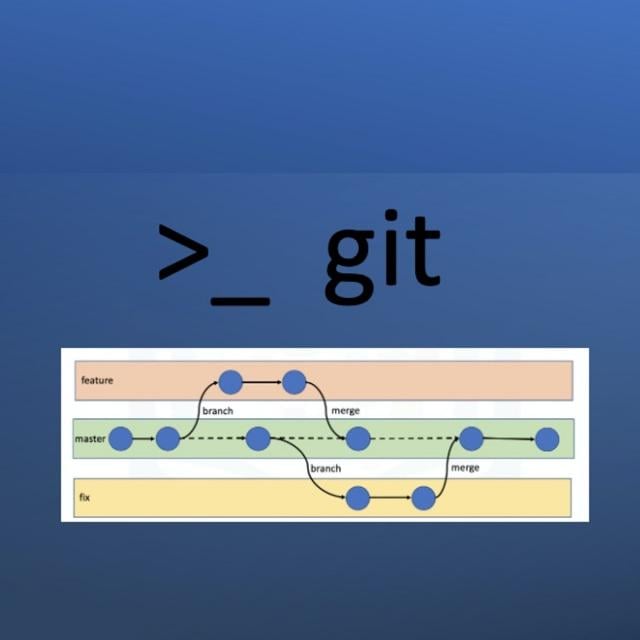
Throughout this course, you'll learn about Git's core functionality so you can understand how and why it’s used in organizations. We’ll look into both basic and more advanced features, like branches and merging. We'll demonstrate how having a working knowledge of a VCS like Git can be a lifesaver in emergency situations or when debugging. And then we'll explore how to use a VCS to work with others through remote repositories, like the ones provided by GitHub.
By the end of this course, you'll be able to store your code's history in Git and collaborate with others in GitHub, where you’ll also start creating your own portfolio!
In order to follow along and complete the assessments, you’ll need a computer where you can install Git or ask your administrator to install it for you.

What You Will Learn

  • Understand why version control is a fundamental tool for coding and collaboration
  • Install and run Git on your local machine
  • Use and interact with GitHub
  • Collaborate with others through remote repositories

Course 3 of 6 in the Google IT Automation with Python Professional Certificate

Syllabus

WEEK 1
Introduction to Version Control
In this module, you'll be introduced to the concept of version control, which will make managing and rolling back your code look super easy. You’ll learn how to differentiate between files and the tools at your disposal to make this happen. Next, you'll be introduced to Git and how you can leverage that platform to improve your coding abilities. Once you’ve got a grasp on what Git is, you’ll install it and start using it to create and clone code repositories. Last up, you’ll deep dive into Git in order to get more familiar with the different tools and commands it has to offer.

WEEK 2
Using Git Locally
In this module, you’ll dive into advanced Git interactions by skipping the staging area for small code changes, and understand how Git uses the HEAD alias to represent checked-out snapshots. Next, you’ll explore how to move and remove files before finally getting a cheat sheet to help you in your Git explorations! The next step of your learning will include how to undo changes before committing and how to amend commits once they’re submitted. Finally, you’ll be able to identify errors in commits that were submitted a while back. In the final section of this module, you’ll explore the concept of branching and merging. You’ll learn what a branch is, how to create one, and how they work in harmony with you and your code. Once you’re comfortable with branching, you’ll dive into merging, how it works with branched data, and how to deal with merge conflicts.

WEEK 3
Working with Remotes
In this module, you’ll be introduced to GitHub and learn how it works with Git. You’ll create new repositories and clone those repositories onto your computer. Next, we’ll explain what a remote repository is, how we can work with them, and how we can host them. You’ll get familiar with commands like modify, stage, and commit, which will be used for local changes, as well as the fetch command, which can pull any changes from remote repositories. Our final lesson will focus on learning about conflicts. This will allow you to explore the concepts of pull-merge-push workflows, pushing remote branches and rebasing your changes.

WEEK 4
Collaboration
In this module, you’ll continue to explore the collaboration tools available in Git. You’ll learn about the tools that are available to help improve the quality of your code and to better track your code. This includes an overview of pull requests and how the typical workflow of a pull request looks like on GitHub. Next, you’ll dive into how you can squash changes in your code. We’ll finish up by providing you with a cheat sheet on fork and pull requests. Next up, we’ll cover what code reviews are and what the code review workflow looks like. Then, you’ll learn about how to use code reviews on GitHub. The final lesson of this module will focus on managing projects. We’ll take a rundown of best practices on managing projects and how to manage collaboration within those projects. We’ll explore different ways of tracking issues and finish up by discussing the concept of continuous integration with your projects.

Go to Class
MOOC List is learner-supported. When you buy through links on our site, we may earn an affiliate commission.

Related Courses

Bash Scripting and System Configuration (Coursera) Coursera
Codio

Bash Scripting and System Configuration (Coursera)

Code and run your first Bash script in minutes without installing anything! This course is designed for learners with no scripting experience. Learners will gain hands-on practice on an Ubuntu system that can be easily transferred to other Unix-based operating systems. The modules in this course cover scripting basics (e.g. control structures), advanced scripting (e.g. regular expressions), git version control, and system configuration (e.g. installing and updating).

Jun 1st 2026
4 Weeks
Introduction to Cloud Development with HTML5, CSS3, and JavaScript (edX) EdX
IBM

Introduction to Cloud Development with HTML5, CSS3, and JavaScript (edX)

Learn the key tools and programming languages to bootstrap your career as a Cloud Developer. Get started with web development using HTML5, CSS3, JavaScript and GitHub. Want to take the first steps to become a Cloud Application Developer? This self-paced online course will lead you through the programming languages and tools you will need to develop your own Cloud and Web Applications.

Self Paced
Self-Paced
DevOps, DataOps, MLOps (Coursera) Coursera
Duke University

DevOps, DataOps, MLOps (Coursera)

Learn how to apply Machine Learning Operations (MLOps) to solve real-world problems. The course covers end-to-end solutions with Artificial Intelligence (AI) pair programming using technologies like GitHub Copilot to build solutions for machine learning (ML) and AI applications. This course is for people working (or seeking to work) as data scientists, software engineers or developers, data analysts, or other roles that use ML.

Jun 8th 2026
5-12 Weeks
Collaborative Coding with Git (FutureLearn) FutureLearn
University of Manchester,Institute of Coding

Collaborative Coding with Git (FutureLearn)

Find out how to improve code quality and work collaboratively on large-scale projects using Git. Gain an in-depth introduction to remote collaboration with Git. Git is an enormously powerful and flexible version control system used by over 90% of developers. On this course, you’ll discover ways to visualise and explore a project’s history through Git repositories. These skills will allow you to quickly adapt to a new collaborative environment, especially when working with Git remotely.

May 1st 2023
5-12 Weeks
Fundamentos y Herramientas de DevOps (edX) EdX
Universidad Anáhuac,AnahuacX

Fundamentos y Herramientas de DevOps (edX)

Sé un elemento crucial para la empresa conociendo los pilares de DevOps para asegurar la integración y entrega continua de software. Aprende a usar diferentes comandos de Linux/Unix que son esenciales para que puedas eficazmente administrar aplicaciones desde la línea de comandos. Así como las bases de la gestión de código fuente a través del uso de la herramienta Git y Github.

Self Paced
Self-Paced
A Beginner's Guide to Open Source Software Development (Linux Foundation) The Linux Foundation
Linux Foundation

A Beginner's Guide to Open Source Software Development (Linux Foundation)

Learn the key concepts in developing open source software. This course introduces developers to the key concepts in developing open source software. It covers the who (successful projects and communities), what (definition), why (benefits), where (Git) and how (licensing, compliance, collaboration tips, managing diversity and continuous development & integration).

Self Paced
Self-Paced
Version Control with Git (Udacity) Udacity
Udacity

Version Control with Git (Udacity)

Learn to track and manage changes. This course covers the essentials of using the version control system Git. You'll be able to create a new Git repo, commit changes, and review the commit history of an existing repo. You'll also learn how to keep your commits organized using tags and branches and you'll master the art of merging changes by crushing those pesky merge conflicts.

Self Paced
Self-Paced
Software Development Basics (FutureLearn) FutureLearn
FutureLearn

Software Development Basics (FutureLearn)

Learn the basics of HTML code, gain expert insights into web development, and decide if the industry is right for you. Kick-start your career in web-based software development. The web design and development industry is growing exponentially and offers several exciting employment opportunities. Many people perceive this field as too complex, assume they won’t understand the material and therefore don’t consider it as a viable job prospect.

Oct 25th 2021
4 Weeks
Learn jQuery by making a complete jQuery Plugin (Eduonix) Eduonix
Eduonix Learning Solutions Pvt. Ltd.

Learn jQuery by making a complete jQuery Plugin (Eduonix)

JavaScript has been steadily gaining popularity since its introduction in 1995 by Netscape and continues to hold its position as the number one language for web pages. JavaScript is a high-level, dynamic, untyped, and interpreted programming language that has been standardized in the ECMAScript language specification and is currently one of the most support languages across all browsers. This is a free course with a MOOC List coupon.

Self-paced
Self-Paced
Advanced Reproducibility in Cancer Informatics (Coursera) Coursera
Johns Hopkins University

Advanced Reproducibility in Cancer Informatics (Coursera)

This course introduces tools that help enhance reproducibility and replicability in the context of cancer informatics. It uses hands-on exercises to demonstrate in practical terms how to get acquainted with these tools but is by no means meant to be a comprehensive dive into these tools. The course introduces tools and their concepts such as git and GitHub, code review, Docker, and GitHub actions.

May 25th 2026
5-12 Weeks