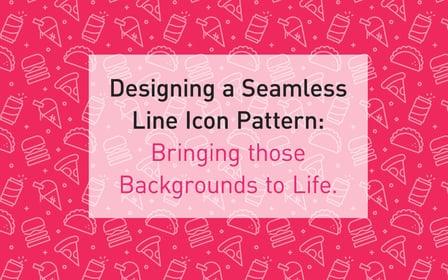
Designing a seamless Line Icon Pattern: Bringing those Backgrounds to Life. (Coursera)

Offered by Skillshare,
Designing a seamless Line Icon Pattern: Bringing those Backgrounds to Life. (Coursera)

In this class you'll learn how to design seamless pattern backgrounds for use on a number of projects, such as: Web/ Mobile, Illustration, Print, Promotional backdrops and more. All within Adobe Illustrator.
We'll cover some basic iconography design, artwork preparation, and the best practises for saving your background out for it's intended purpose.

I personally enjoy everything made simple, so I have made it my goal to do so with this class! It's the best way to learn something you feel passionate about!
I will also try to make my class as fully comprehensive as possible so anyone can have a go. Beginner to Senior level designers alike!

Project Description

Your first mission, if you choose to accept it (sorry, I couldn't resist!): Sketch Them Out!
Sketch out a set of 5-10 (anywhere in between is fine) line icon ideas on paper. Choose any theme you want to. I have some ideas for you if you can't think of anything just now:

  • Food Related Line Icons (hot dogs, popsicles, ice-cream, pizza, burgers, veggies, sushi...etc)
  • Tech Related Line Icons (monitors, mobile devices, drawing tablets, mouse clickers, floppy discs!?)
  • Pet Related Line Icons (cats, dogs, fish, lizards, rabbits, snails, or even a combination of them all?)
  • Hobby Related Line Icons (sports, tv, gaming, movies, snacks, hiking, doodling...etc )

Now scan them or take a photo of them and drop them onto your computing, digital maker machine using Adobe Illustrator(Ai).

Mission 2: Prepare to Digitalize
Prepare the Ai file and artboard. At this point you will be preparing your 500px by 500px artboard, this will help with making sure they're of a nice weight when you do resize them. Then applying a grid to your artboard in which to create your icons. Finally import the sketched/doodles icons into Ai, ready to trace.

Mission 3: Compose your icons
At this stage you'll want to compose your icons from the sketch you produced. Making any fine detail adjustments, tweaking the size to make sure they're all proportionate and consistent. If you're not 100% on creating icons, don't worry, I have some files attached for you to use. :{) Like I said, it's for all to learn how to do!

Mission 4: Prep, Test, Tweak, Repeat, EXPORT
Now, work the pattern tile, test, tweak and repeat until you're 100% (or as near to it, we are designers after all) happy with your patterned background! Remembering to align and place the line icons into a nice format, giving plenty of room to breathe so as not to look too crowded and distracting.

Mission 5: FIST PUMP!
WOOHOO! Stand up, take a bow and release an over exaggerated fist pump (downward motion needed)! Not really a step at all! But who doesn't like to celebrate!? Now you're ready to use that pattern on all things great and small! Plus, now you know how, you can go and make TONS more and use them EVERYWHERE!
No cheaters please (you're only doing it to yourself, mind) - For those who are struggling with the artboard set up or are in a bit of a dash, I have attached a CS4 Ai file for you to use as your base template when it comes to creating your background pattern tile. This comes complete with ready made icons for you to align and place.
Go to Class
MOOC List is learner-supported. When you buy through links on our site, we may earn an affiliate commission.

Related Courses

Writing Code Faster with Emmet (Skillshare) Skillshare
Skillshare

Writing Code Faster with Emmet (Skillshare)

I LOVE finding ways to speed up or automate my work. So I'm very excited to introduce you to Emmet, a plugin that enables you to write code FASTER. What you will need: Emmet is available in most web editors. Adobe Dreamweaver, Brackets, Sublime Text etc. For this class, I'll be demonstrating Emmet using an online web editor I use on a daily basis - Codepen.

Self Paced
Self-Paced
WordPress for Beginners - Understand WordPress Quickly (Skillshare) Skillshare
Skillshare

WordPress for Beginners - Understand WordPress Quickly (Skillshare)

Learn how to work with WordPress and develop a website using AIT WordPress Themes. No coding or experience required. This class presents the basics of working with WordPress and offers practical screencast tutorials to teach you how to use our themes when building a new website. In short videos, you can find answers to FAQs that beginners most often encounter when getting familiar with WordPress. The course contains more than one hour of video tutorials.

Self Paced
Self-Paced
Web Design Essentials: Creating Marketing Homepages That Drive Results  (Skillshare) Skillshare
Skillshare

Web Design Essentials: Creating Marketing Homepages That Drive Results (Skillshare)

Design websites that drive results! In this 60-minute class, join Dennis Field — a designer and product evangelist for web prototyping leader InVision — as he shares how to refine your creative process, capitalize on feedback, and use best practices to design a marketing site that leads to conversions for your company. This class is perfect for freelance website and product designers, small web design teams, and everyone who wants to increase the effectiveness of their web design.

Self Paced
Self-Paced
UI/UX: You already know more than you think (Skillshare) Skillshare
Skillshare

UI/UX: You already know more than you think (Skillshare)

Have you ever given thought to who your audience is for a specific project? Tried to make your piece as user-friendly as possible? Done a dry run on how someone interacts with your book/brochure/website? Tried to establish the most effective hierarchy for the information you’re conveying? Then you’ve already done interface and experience design.

Self Paced
Self-Paced
Designing Repeat Patterns: From Icons to Apparel and Beyond  (Skillshare) Skillshare
Skillshare

Designing Repeat Patterns: From Icons to Apparel and Beyond (Skillshare)

It's all about idioms and icons in this 30-minute class on designing a repeat pattern using symbols and icons! Kimi Lewis, artist and product designer at the Noun Project, will walk you through her process of creating a pattern in full repeat — one that you can apply to clothing, bags, accessories, wallpaper, or practically anywhere you’d like.

Self Paced
Self-Paced
How to Create a Personal/Portfolio Website (Skillshare) Skillshare
Skillshare

How to Create a Personal/Portfolio Website (Skillshare)

This class will teach you how to professionally create an awesome personal/portfolio website! By the end of the class,you'll have a beautiful and fully functioning website that can help you land jobs, clients, and mega style points with employers. This class is taught step-by-step so it's very easy to follow along with your own website. I also include a free template of the website we will we making (in the Projects Tab > Resources), as well as follow along images for you.

Self Paced
Self-Paced
The Business of Web Design: How to Grow your Ecommerce Web Design Business (Skillshare) Skillshare
Skillshare

The Business of Web Design: How to Grow your Ecommerce Web Design Business (Skillshare)

Learn how to grow your web design business online. Join UX consultant Paul Boag for a 75-minute course on core concepts and tactics that will help you stand out and survive in today’s highly competitive web design industry. This class is perfect for both freelance developers, designers, agencies, and small web design teams.

Self Paced
Self-Paced
How To Make A Wordpress Website - Elementor Tutorial (Skillshare) Skillshare
Skillshare

How To Make A Wordpress Website - Elementor Tutorial (Skillshare)

Come learn how to make a wordpress website in 1 hour! I will show you step by step to easily create your wordpress website in a few clicks! Lets Get Started! Its simple, gets your domain for your wordpress website. Install Wordpress. Install Your Wordpress Theme. Than simply install a plugin that will give you access to more than 1700+ elementor templates for free!

Self Paced
Self-Paced